Complete details are in AqualinkD wiki
You will need a wired serial RS485 connection to the Jandy Power Center (Control Panel).- If you have an inside controller/keypad mounted on your wall this is usually the best place.
- If not, the outside control panel is the next best place.
- Note. The AqualinkD Radxa Kit is not waterproof or suitable for extreme climates. However, it can be mounted outside in a waterproof box in mild climates.
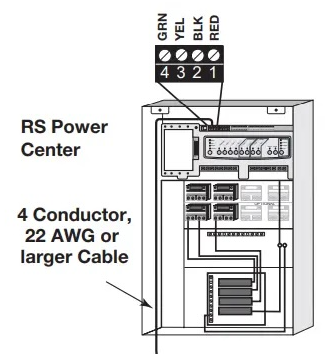
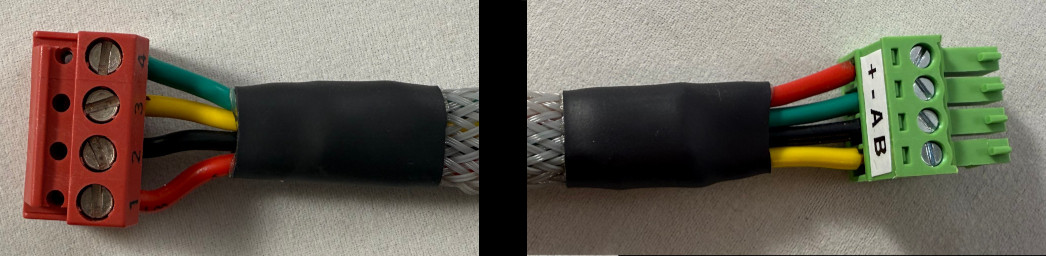
If your installer followed the Jandy wiring, below are the colors, and where to connect them to on a USB2RS485 adapter, or AqualinkD RS485 HAT.
Note the pinouts are different between RS Power Center and RS485 HAT
| RS Power Center | Description | Color | AqualinkD RS485 Hat |
|---|---|---|---|
| Pin #1 Red | Power + | Pin #1 (+) | |
| Pin #2 Black | Data + | Pin #3 (A) | |
| Pin #3 Yellow | Data - | Pin #4 (B) | |
| Pin #4 Green | Ground | Pin #2 (-) |
4 Core, 24AWG twisted pair cable is recommended. More Information & product links